Creator Guides & Media Tutorials
In-depth technical guides and tutorials to help you format vertical videos, design high-CTR thumbnails, and optimize social media workflows.
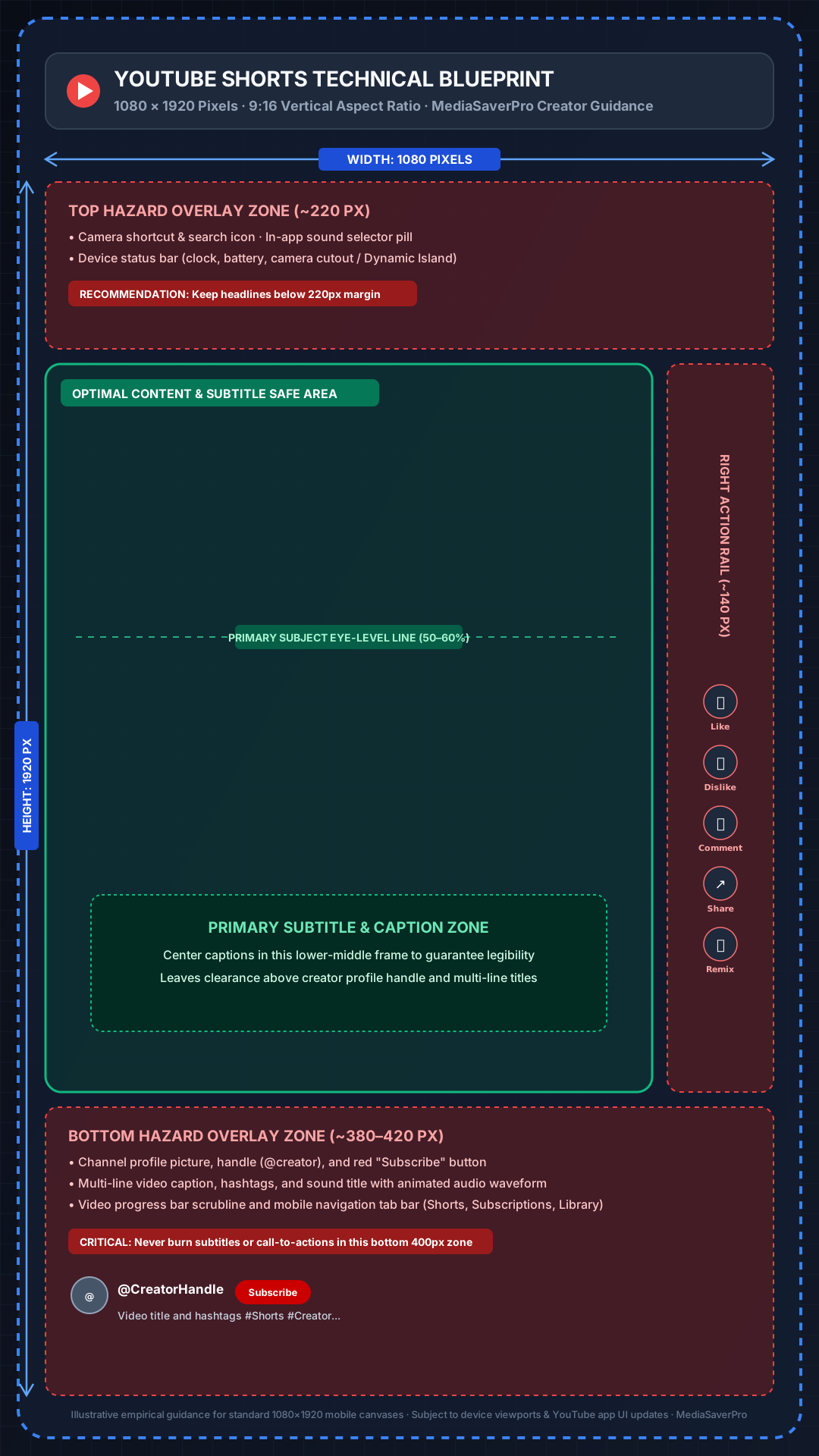
YouTube Shorts Dimensions, Aspect Ratio & Length: Complete Creator Guide (2026)
Master YouTube Shorts dimensions (1080 x 1920), 9:16 vertical aspect ratio, mobile UI safe zones, duration limits, and export settings for maximum video quality.
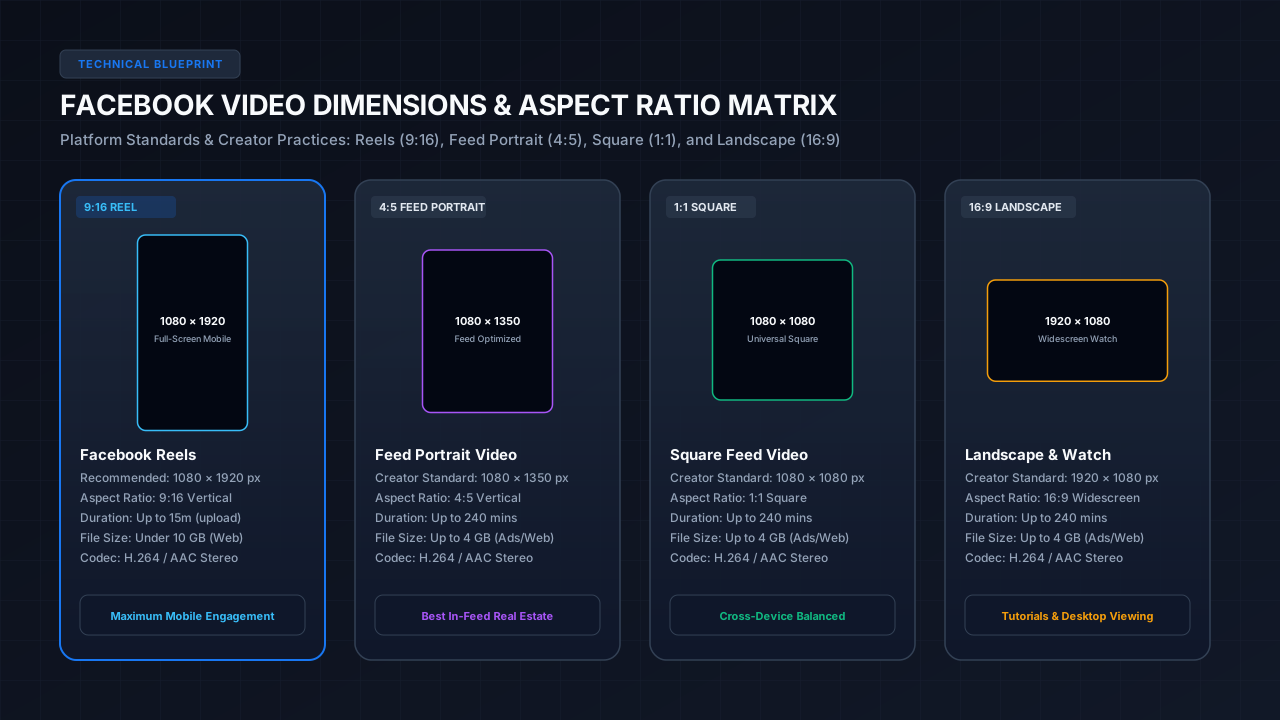
Facebook Video Dimensions, Sizes & Formats: Complete Creator Guide
Master Facebook video dimensions (1080x1920 Reels, 1080x1350 Feed, 1080x1080 Square, 1920x1080 Landscape), aspect ratios, safe zones, file sizes, and export settings.
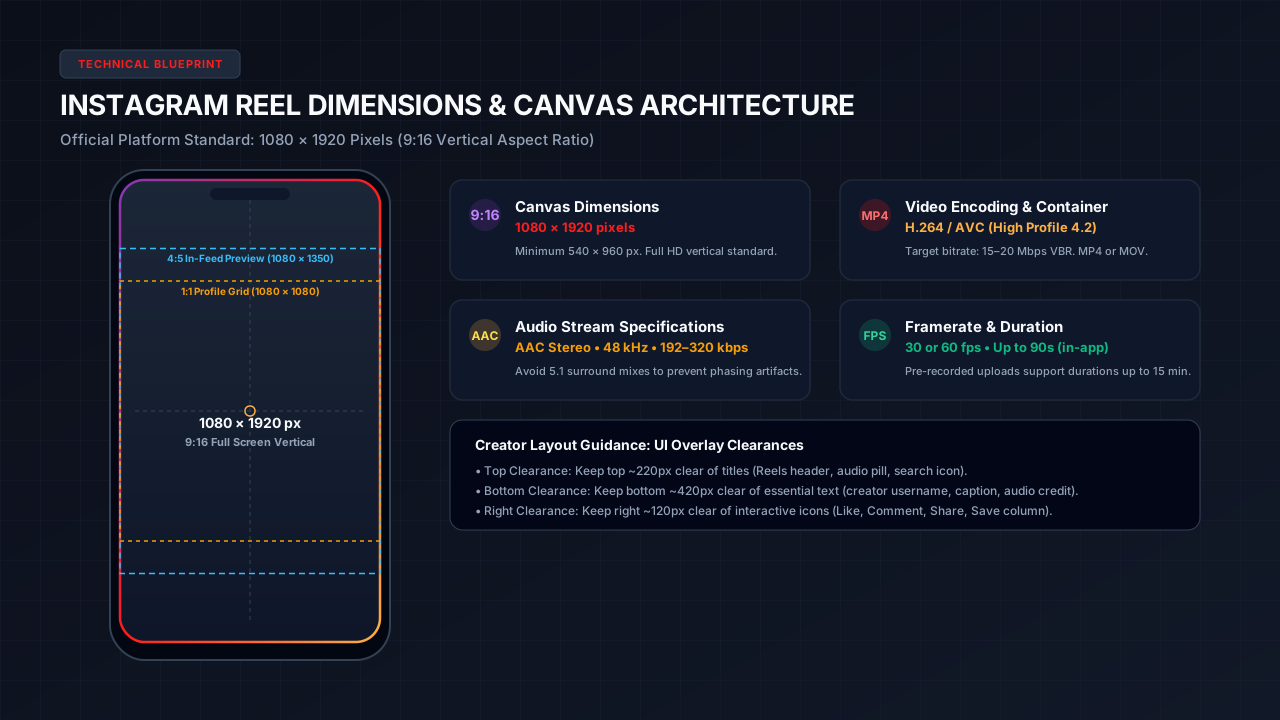
Instagram Reel Dimensions, Size & Aspect Ratio: Complete Creator Guide
Master Instagram Reel dimensions (1080 x 1920), 9:16 aspect ratio, empirical safe zones, frame rates, and export settings for optimal video clarity.
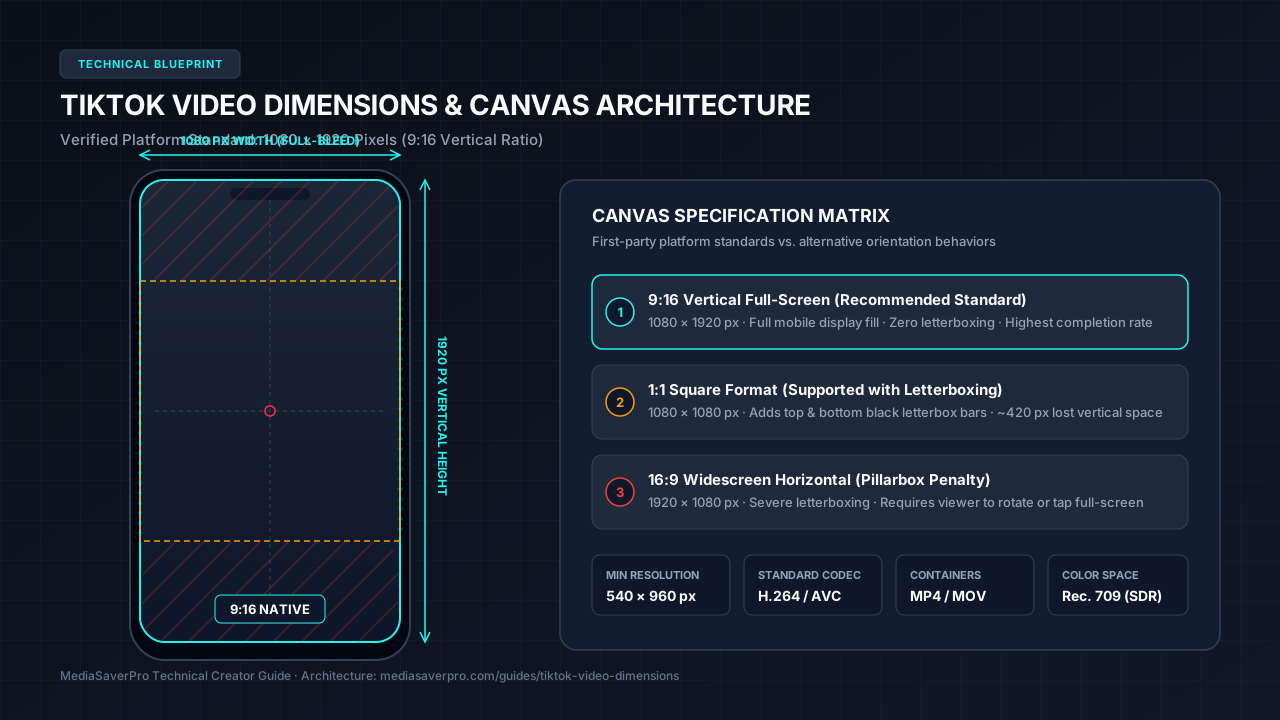
TikTok Video Dimensions, Aspect Ratio & Formats: Complete Guide (2026)
Master TikTok video dimensions (1080 x 1920), 9:16 vertical aspect ratio, safe zones, export settings, and video formats for maximum clarity.
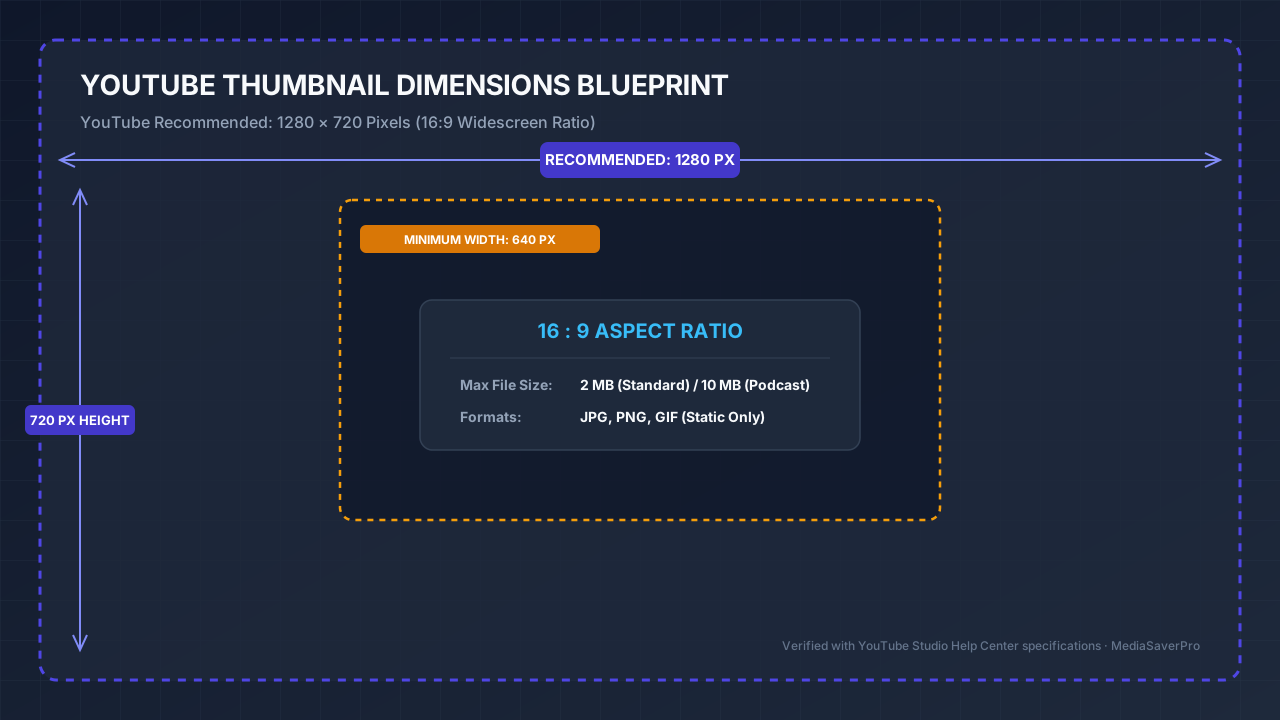
YouTube Thumbnail Size & Dimensions: Creator Guide
YouTube's recommended thumbnail size is 1280 x 720 pixels (16:9 aspect ratio, max 2MB). Complete technical specs, practical safe zones, and mobile formatting tips.

YouTube Thumbnail & CTR Optimization: High-Converting Design Patterns
Master YouTube thumbnail design principles: visual hierarchy, color contrast, mobile legibility, title synergy, and YouTube Studio Test & Compare workflows.
How to Record Live Streams Online: TikTok, Facebook & YouTube Technical Guide
Learn how to capture public live broadcasts and download stream replays online. Discover the technical differences between live HLS capture vs VOD downloads, platform rules, and safe tools.
How to Record TikTok LIVE Online Without an App: Step-by-Step Technical Guide
Learn how to capture public TikTok LIVE streams directly in your web browser into clean, unwatermarked MP4 video with synchronized audio on PC, Mac, and mobile without installing APKs.
How to Save an Instagram LIVE Video: Active Streams, Replays & Session Architecture
Discover the technical requirements for saving Instagram Live streams. Understand direct DASH manifests, server session resolvers, and downloading published live replays safely.
How to Clip a Livestream Without Re-encoding: Keyframe-Aligned Lossless Guide
Learn how to create short highlight clips from multi-hour livestreams in seconds. Master keyframe-aligned stream copy (-c copy) to export watermark-free MP4 clips with zero quality loss.
Live Stream Recording vs. Screen Recording: Video Fidelity, Audio & Latency Explained
Compare direct HLS live stream capture against desktop and mobile screen recording. Learn how network stream copy eliminates UI clutter, audio distortion, and frame drops.
How to Extract Frames from Video Without Uploading: In-Browser Privacy Guide
Learn how to extract full-resolution, lossless PNG and JPEG frames from MP4, WebM, and MOV video files 100% locally in your browser memory with zero server upload.
How to Watch a Video Frame by Frame Online: Keyboard Shortcuts & PTS Timecodes
Master frame-accurate video inspection in your browser. Learn keyboard stepping shortcuts (Arrow keys, J/L), presentation timestamp (PTS) calculations, and avoiding scrub drift.
How to Create a Storyboard PDF from Video: Shot Curation & Contact Sheet Guide
Learn how to curate key video frames into printable multi-page PDF contact sheets with presentation timestamps, custom titles, and sequential ZIP archives.
Video Frame Extraction vs. Screen Screenshots: Image Quality & Resolution Compared
Understand the technical differences between extracting raw video frames and taking operating system screenshots. Compare display DPI scaling, color spaces, and compression.
Social Video Dimensions & Aspect Ratio Standards
Before uploading vertical reels, shorts, or thumbnail covers, verify your timeline resolution against current platform ingestion standards. Detailed benchmarks are tested and maintained across each individual guide:
| Platform Asset | Canvas Resolution | Aspect Ratio | Recommended Safe Area | Technical Guide |
|---|---|---|---|---|
| YouTube Thumbnails | 1280 × 720 px | 16:9 Landscape | Avoid bottom-right timestamp badge (~180×60px) | Read Thumbnail Guide → |
| Instagram Reels | 1080 × 1920 px | 9:16 Vertical | ~940 × 1280 px (keep bottom 420px clear) | Read Reel Guide → |
| TikTok Videos | 1080 × 1920 px | 9:16 Vertical | ~940 × 1300 px (clear top 130–160px, bottom 450–480px, right 140–150px) | Read TikTok Guide → |
| YouTube Shorts | 1080 × 1920 px | 9:16 Vertical | ~920 × 1260 px (clear title overlay & right rail) | Read Shorts Guide → |
| Facebook Video & Reels | 1080 × 1350 / 1920 px | 4:5 Feed / 9:16 Reel | ~940 × 1170 px (maintain safe zone with burned captions) | Read Facebook Guide → |
Ready to Inspect or Download Media?
Select a platform downloader below to inspect public media streams, test cover graphics, or save videos:
TikTok Downloader
Clean MP4 video without watermarks, audio MP3 extraction, and photo slideshow downloads.
Instagram Downloader
Download public Reels with audio, standard feed videos, single photos, and carousel galleries.
Facebook Video Downloader
Save Facebook Watch videos and vertical Reels in available SD and HD streams with audio.
YouTube Creator Tools
YouTube thumbnail grabber, MaxRes cover downloader, Shorts analysis, and embed code generator.