
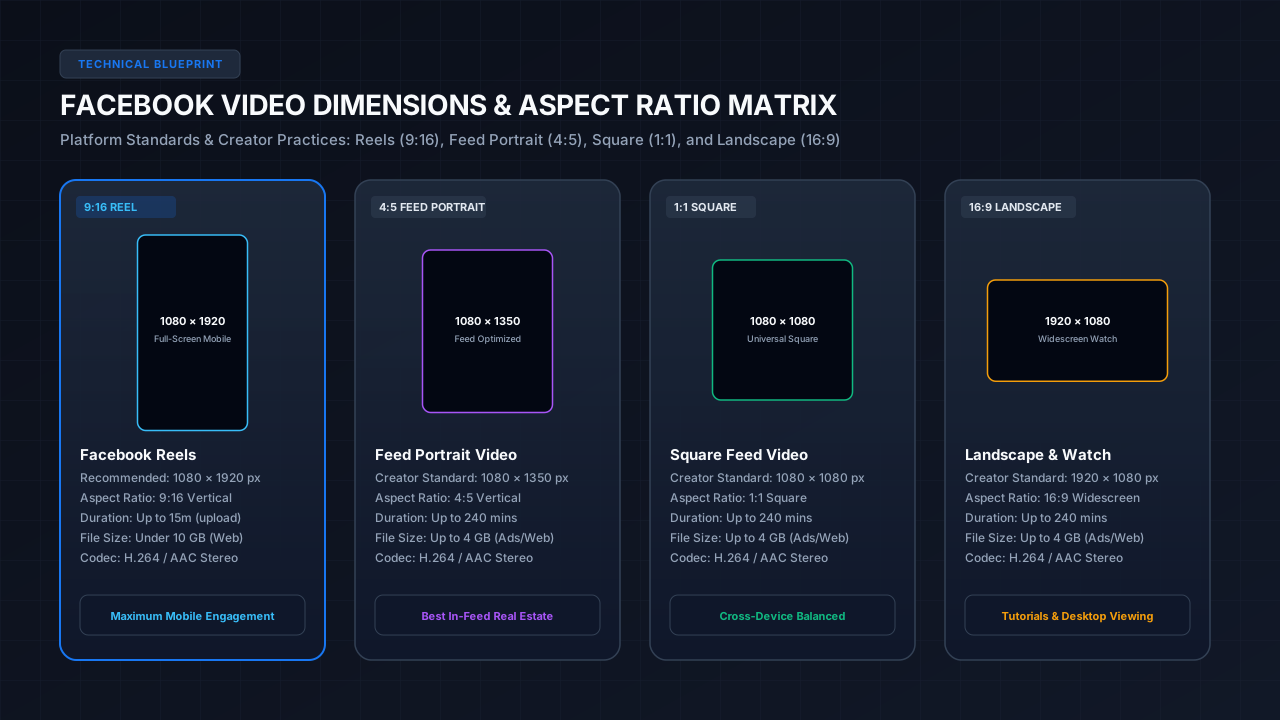
Facebook Video Specifications at a Glance
*Important Transparency Note: Meta specifications can vary by publishing surface (mobile app, desktop browser, Meta Business Suite, Graph API, or Ads Manager) and evolve over time. The reference matrix below clearly distinguishes official platform rules from recommended creator workflows:*
| Surface / Parameter | Platform Specification | Classification | Source & Context |
|---|---|---|---|
| Facebook Reel Aspect Ratio | 9:16 Vertical | OFFICIAL PLATFORM REQUIREMENT | Meta Help Center & Graph API Documentation |
| Reel Recommended Dimensions | 1080 × 1920 pixels | RECOMMENDED CREATOR PRACTICE | Meta Developer Docs recommend 1080p for crisp full-screen playback |
| Reel Minimum Resolution | 540 × 960 pixels | OFFICIAL GRAPH API REQUIREMENT | Lower bounds enforced by Meta Graph API (Video Ads require min 600px width) |
| Feed Portrait Dimensions | 1080 × 1350 pixels (4:5) | RECOMMENDED CREATOR PRACTICE | Common creator export standard maximizing vertical mobile feed height |
| Feed Square Dimensions | 1080 × 1080 pixels (1:1) | RECOMMENDED CREATOR PRACTICE | Standard creator export for balanced desktop and mobile feed display |
| Landscape Dimensions | 1920 × 1080 pixels (16:9) | RECOMMENDED CREATOR PRACTICE | Standard 1080p widescreen for horizontal video and desktop Facebook Watch |
| Accepted Aspect Ratios | 16:9 to 9:16 continuum | OFFICIAL PLATFORM BEHAVIOR | Meta accepts any aspect ratio between widescreen (16:9) and vertical (9:16) |
| Container Formats | MP4 or MOV | OFFICIAL PLATFORM RECOMMENDATION | Meta Help Center officially recommends MP4 and MOV containers |
| Video Codec | H.264 / AVC (Progressive) | OFFICIAL PLATFORM RECOMMENDATION | Meta Help Center officially recommends H.264 video encoding |
| Audio Codec | Stereo AAC | OFFICIAL PLATFORM RECOMMENDATION | Meta Help Center specifies Stereo AAC at 44.1 kHz (48 kHz is creator standard) |
| Frame Rates | 30 fps or lower recommended (up to 60 fps accepted) | OFFICIAL PLATFORM RECOMMENDATION | Meta Help Center recommends ≤30 fps; Graph API and Ads support up to 60 fps |
| File Size Limit (Reels Web) | Under 10 GB recommended | OFFICIAL PLATFORM GUIDELINE | Meta Help Center officially recommends keeping Reel files under 10 GB |
| File Size Limit (Ads & Mobile) | Up to 4 GB | OFFICIAL PLATFORM REQUIREMENT | Hard ceiling for Meta Video Ads and standard mobile upload pipelines |
| Reel In-App Duration | Up to 90 seconds | OFFICIAL PLATFORM REQUIREMENT | Maximum duration when recording live through the Facebook in-app camera |
| Reel Uploaded Duration | Up to 15 minutes | OFFICIAL PLATFORM BEHAVIOR | Pre-recorded video uploaded via Meta Business Suite desktop or mobile gallery |
| Feed Video Duration | Up to 240 minutes (4 hours) | OFFICIAL PLATFORM BEHAVIOR | Traditional timeline video post duration limit across Pages and Profiles |
Facebook Video Dimensions & Aspect Ratios Explained
Facebook serves video across distinct viewer contexts—from high-velocity vertical scrolling in the Reels tab to full-width viewing on desktop computers and connected TVs. Choosing the right canvas dimension depends on where your audience discovers your content:
1. Facebook Reels (1080 × 1920 Pixels • 9:16 Vertical)
*Classification: RECOMMENDED CREATOR PRACTICE (9:16 Aspect Ratio is Official Platform Standard)*
Facebook Reels utilize a full-screen vertical frame. While Meta accepts any 9:16 file meeting the minimum 540 × 960 resolution threshold:
2. Feed Portrait Video (1080 × 1350 Pixels • 4:5 Vertical)
*Classification: RECOMMENDED CREATOR PRACTICE*
If you are publishing a regular video post directly to your Facebook Page or Profile timeline rather than the Reels tab, the 4:5 aspect ratio is often the most effective format.
3. Square Feed Video (1080 × 1080 Pixels • 1:1 Aspect Ratio)
*Classification: RECOMMENDED CREATOR PRACTICE*
Square video is the most versatile cross-platform format on Meta properties.
4. Landscape & Facebook Watch (1920 × 1080 Pixels • 16:9 Widescreen)
*Classification: RECOMMENDED CREATOR PRACTICE*
For long-form creator shows, cinematic video series, gaming livestreams, and podcast clips, 16:9 remains the universal widescreen standard.
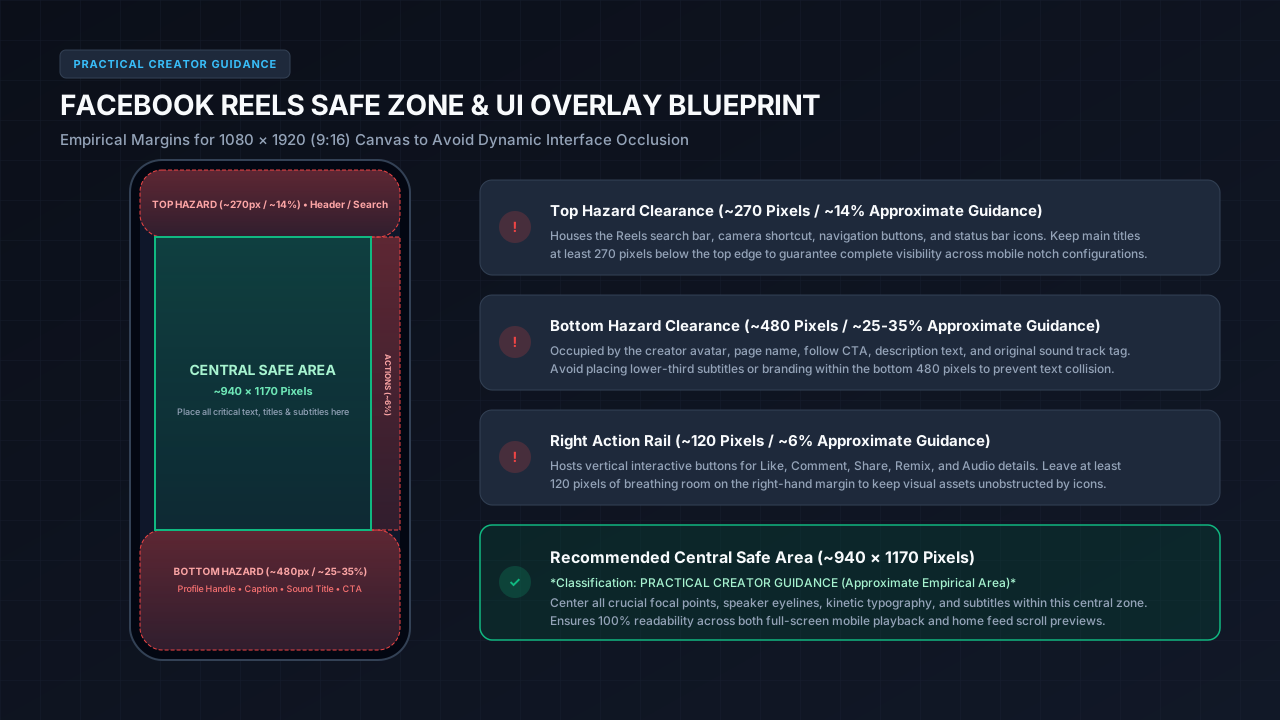
Facebook Reels UI Safe Zones: Practical Creator Layout Guidance
One of the most common pitfalls for creators is burning text, titles, or branding into portions of the 9:16 canvas where Facebook's interactive interface elements overlap them. Unlike a clean video player, the Facebook Reels mobile interface places multiple dynamic overlays across the active screen.
1. Top Hazard Zone (~270 Pixels / ~14% Approximate Guidance)
The top ~270 pixels of the canvas display the Facebook Reels header bar, search icon, camera shortcut, and system status bar elements.
2. Bottom Hazard Zone (~480 Pixels / ~25–35% Approximate Guidance)
The bottom ~480 pixels contain dense interactive interface overlays:
3. Right Action Rail (~120 Pixels / ~6% Approximate Guidance)
The right-hand edge features a vertical column of interactive buttons:
4. Recommended Central Safe Area (~940 × 1170 Pixels)
*Classification: APPROXIMATE EMPIRICAL GUIDANCE*
Subtracting the approximate top (~270px), bottom (~480px), and right (~120px) margins leaves a central ~940 × 1170 pixel safe area. Placing all crucial hooks, focal points, speaker eyelines, and subtitles within this boundary guarantees clear visibility on virtually every mobile screen.
Publishing Surface Distinctions: Organic, Graph API & Meta Ads
A frequent source of creator confusion is conflating technical requirements across different Meta uploading channels:
Supported File Formats, Codecs & Audio Standards
To ensure fast processing without server-side transcode errors, prepare your master video exports according to Meta's ingestion recommendations:
Container Formats
*Classification: OFFICIAL PLATFORM RECOMMENDATION*
.mp4) with FastStart / Web Optimized flag enabled (moov atom at front of file)..mov) is accepted, but MP4 provides faster server ingestion and broader browser playback compatibility.Video Codec
*Classification: OFFICIAL PLATFORM RECOMMENDATION & RECOMMENDED CREATOR PRACTICE*
Audio Specifications
*Classification: OFFICIAL PLATFORM RECOMMENDATION & RECOMMENDED CREATOR PRACTICE*
Frame Rates
*Classification: OFFICIAL PLATFORM RECOMMENDATION*
File Size Limits and Duration Maximums by Surface
Facebook imposes different file size and duration ceilings depending on the publishing interface:
| Surface | Maximum File Size | Maximum Duration | Notes & Sources |
|---|---|---|---|
| Facebook Reels (Desktop Web / Studio) | Under 10 GB recommended | Up to 15 minutes | Meta Help Center recommendation for desktop uploads |
| Facebook Reels (In-App Camera) | N/A (Direct stream) | Up to 90 seconds | Maximum recording duration using the native in-app camera |
| Facebook Page Feed Post | Up to 4 GB (up to 10 GB web) | Up to 240 minutes (4 hours) | Long-form videos, broadcasts, and creator page posts |
| Meta Video Ads (Campaigns) | 4 GB hard limit | 1 second to 241 minutes | Strict ad placement constraints vary by objective |
Recommended Export Settings for Premiere Pro, DaVinci Resolve & CapCut
*Classification: RECOMMENDED CREATOR PRACTICE*
*Note: These settings represent optimized creator production workflows, not mandatory Meta platform rules. Adjust bitrates according to your motion complexity:*
Adobe Premiere Pro Export Settings
DaVinci Resolve Export Settings
CapCut Desktop & Mobile Export Settings
How to Avoid Compression and Blurry Video on Facebook
*Classification: MEDIASAVERPRO PRACTICAL GUIDANCE*
If your exported video looks sharp on your editing monitor but appears soft or pixelated once published to Facebook, follow these three practical optimizations:
1. Enable "Upload at Highest Quality" in the Facebook Mobile App
By default, the Facebook mobile application may compress video uploads when connected to mobile data to save bandwidth.
2. Export Directly in 1080p Instead of 4K
While modern smartphone cameras capture in 4K (2160 × 3840), Facebook delivers Reels and feed videos at 1080p maximum. Meta documentation allows file uploads with widths up to 4,000 pixels (divisible by 16), but the platform's automated server pipeline re-encodes and downsamples 4K footage using fast-compression algorithms.
3. Allow Edge CDN Transcoding Propagation Time
Immediately after a video finishes uploading, Facebook frequently serves a lower-resolution standard-definition (SD) version while high-definition (HD) stream renditions are processed and distributed across global edge CDN servers.
Frequently Asked Questions
What size should a Facebook video be?
For vertical Facebook Reels, the recommended resolution is 1080 × 1920 pixels (9:16 aspect ratio). For timeline feed posts, 1080 × 1350 pixels (4:5 portrait) or 1080 × 1080 pixels (1:1 square) provide optimal viewing across desktop and mobile devices. Meta officially supports aspect ratios from 16:9 widescreen to 9:16 vertical with widths up to 4,000 pixels.
What is the maximum file size for a Facebook video?
For organic Facebook Reels uploaded via desktop or Meta Business Suite, Meta recommends keeping files under 10 GB. For Meta Video Ads, the official platform limit is strictly 4 GB. For fastest upload processing, keeping files under 2 GB is recommended.
How long can a Facebook Reel be?
Facebook Reels recorded directly through the in-app camera have a duration limit of 90 seconds. However, pre-recorded video files uploaded through the gallery or desktop Meta Business Suite can be up to 15 minutes in duration.
Does Facebook support 4K video uploads?
Meta documentation allows video uploads with widths up to 4,000 pixels (divisible by 16), which includes 4K resolutions. However, Facebook's delivery pipeline serves content at 1080p maximum. Exporting directly in 1080p using high-bitrate VBR yields superior visual results compared to server-side downsampling.
What is the best video format for Facebook?
The officially recommended video format is MP4 or MOV with H.264 video compression and stereo AAC audio (44.1 kHz or 48 kHz). MP4 files process faster upon upload and ensure universal playback across all browsers and devices.
What aspect ratio is best for Facebook feed videos?
For timeline feed posts, 4:5 vertical (1080 × 1350) is the most effective aspect ratio because it occupies maximum vertical screen real estate without requiring full-screen viewer interaction.
How do I stop Facebook from cropping my Reel subtitles?
Place all text, subtitles, and logos within the central ~940 × 1170 pixel safe area. Maintain at least 270 pixels of clearance from the top edge and 480 pixels from the bottom edge to avoid overlap with the creator handle, caption, and music title.
Can I inspect public Facebook videos to verify their uploaded stream resolution?
Yes. You can paste any public Facebook video or Reel link into the MediaSaverPro Facebook Video Downloader to inspect available MP4 stream qualities, verify resolutions, and download public media directly in your browser.
Inspect and Optimize Public Facebook Media
Understanding exact media parameters empowers creators to edit, format, and publish video that maintains maximum visual clarity across Meta platforms. Whether you are benchmarking engagement safe zones, archiving your published content, or inspecting stream codecs on public posts, MediaSaverPro provides fast, browser-based inspection tools.
Try our Facebook Video Downloader to analyze public Facebook Reels, Watch clips, and feed video posts in verified MP4 format with audio merged. You can also explore our complete library of Creator Guides & Media Tutorials, including our in-depth guides on Instagram Reel Dimensions & Safe Zones and TikTok Video Dimensions & Formatting.