
Quick Answer: What Are the Ideal TikTok Video Dimensions?
tiktok.com/upload), file sizes up to 4 GB are supported, with video durations up to 60 minutes for eligible accounts. 1080 × 1920 is a practical vertical export target for creators; higher-resolution uploads may be recompressed during ingestion, making delivered quality variable. MediaSaverPro recommends exporting a dedicated 1080 × 1920 master file at 12–16 Mbps VBR and placing core titles and captions within an approximate 910 × 1500 pixel practical placement area (an editorial guideline, not an official platform specification).TikTok Video Specifications at a Glance
Producing video for TikTok involves two distinct technical categories: platform specifications enforced during file ingestion, and practical creator presets that preserve sharpness:
| Parameter | Official Platform Requirement | MediaSaverPro Creator Recommendation | Application Context |
|---|---|---|---|
| Canvas Dimensions | 1080 × 1920 px (Recommended) | 1080 × 1920 px | Native mobile display |
| Aspect Ratio | 9:16 (Standard), 1:1, 16:9 | 9:16 Vertical exclusively | Eliminates letterboxing |
| Minimum Resolution | 540 × 960 px | 1080 × 1920 px | Platform minimum threshold |
| File Format | MP4, MOV (Web accepts WebM) | MP4 (MPEG-4 Part 14) | Universal playback compatibility |
| Video Codec | H.264 / AVC | H.264 (High Profile 4.2) | Reliable platform transcoding |
| Audio Format | AAC Audio Stream | AAC Stereo, 48 kHz, 192–320 kbps | Studio-grade playback clarity |
| Target Frame Rate | 24, 30, or 60 fps | 30 fps (standard) or 60 fps (motion) | 60 fps for action or gaming |
| Video Bitrate | Variable platform compression | 12 Mbps to 16 Mbps VBR | Balances file size with detail |
| Desktop Web File Limit | Up to 4 GB (Desktop Web) | Under 1 GB for rapid browser upload | TikTok Studio (tiktok.com/upload) |
| In-Feed Ads File Limit | ≤ 500 MB (TikTok Ads Manager) | 100 MB to 250 MB | Paid TikTok Ads Manager campaigns |
| Maximum Duration | Up to 60 min (Extended Accounts) | 60 to 180 seconds for organic reach | Short-form algorithmic retention |
| Color Space | Standard Dynamic Range (SDR) | Rec. 709 (sRGB color matrix) | Prevents washed-out HDR playback |
Understanding the 9:16 Aspect Ratio
Smartphones are held vertically over 94% of the time. TikTok's recommendation algorithm rewards full-screen vertical immersion, making aspect ratio planning essential for viewer retention.
The 1080 × 1920 Canvas
An aspect ratio describes proportional width to height. A 9:16 vertical ratio means that for every 9 horizontal units, the canvas spans 16 vertical units. In editing suites like Premiere Pro, DaVinci Resolve, Final Cut Pro, and CapCut, this translates to a native canvas of 1080 pixels wide by 1920 pixels tall.
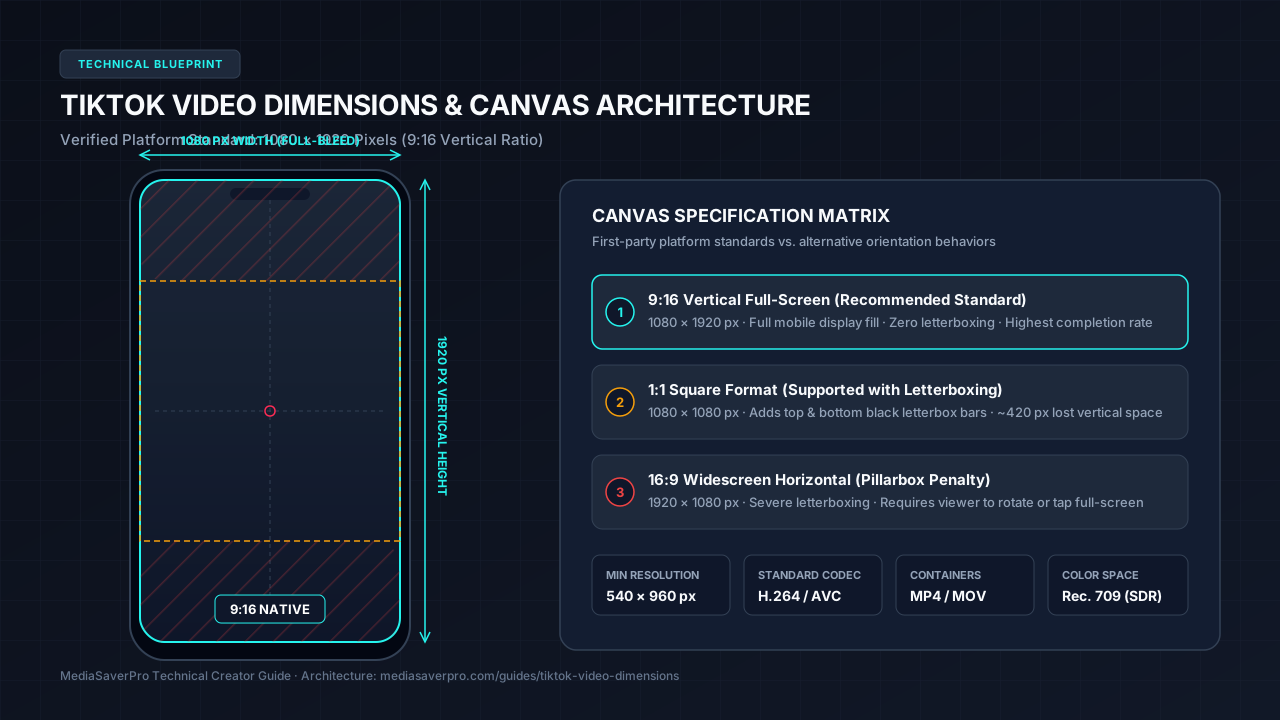
A 1080 × 1920 canvas provides a 1:1 square pixel aspect ratio, ensuring rendered pixels map directly to smartphone displays without distortion.
Square and Horizontal Video
While TikTok accepts horizontal footage (16:9) and square clips (1:1), non-vertical uploads introduce severe visual friction:
When repurposing landscape footage, MediaSaverPro recommends reframing the action using pan-and-scan crops, split-screen layouts, or blurred background fills to fill the 9:16 frame.
TikTok Safe Zones and UI Overlays
Unlike a desktop player, TikTok overlays controls directly over your video canvas. Understanding these overlay zones is critical for clean framing.
UI Areas That Can Cover Video Content
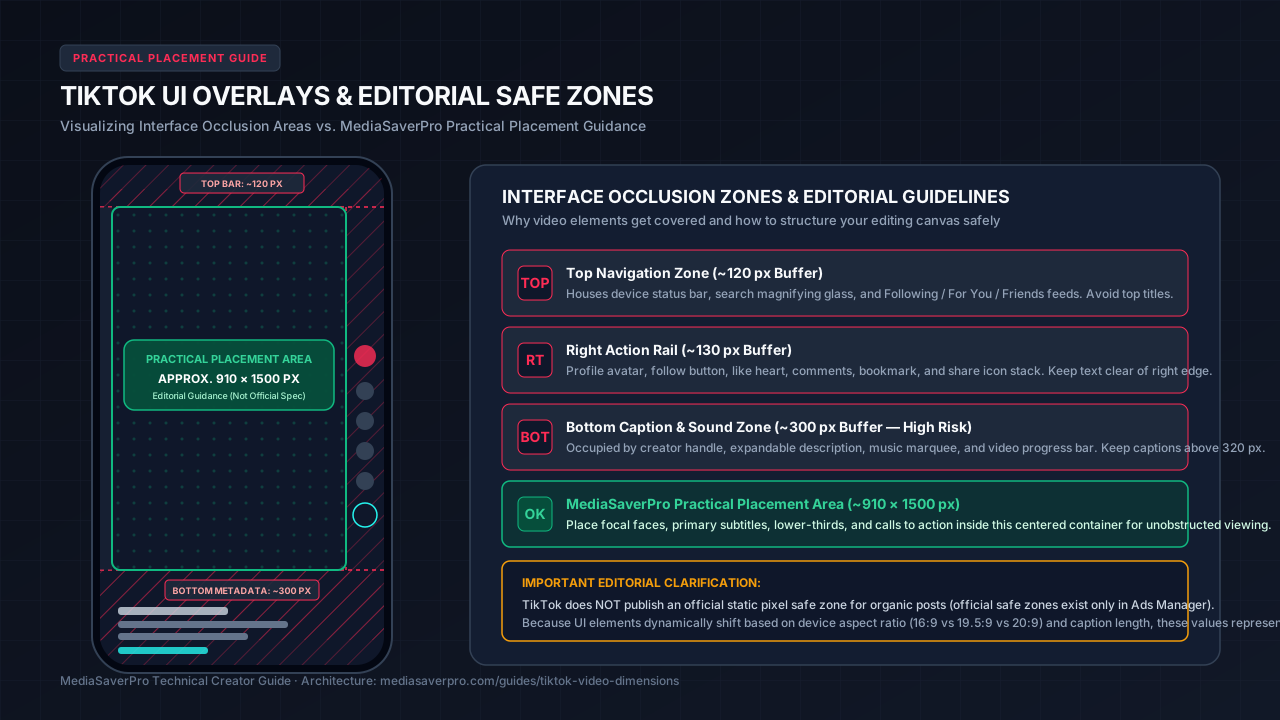
TikTok's interface encroaches upon your 1080 × 1920 canvas from several key directions:
MediaSaverPro Practical Placement Zone
MediaSaverPro uses a conservative practical placement area when designing 1080 × 1920 TikTok videos. This is an editorial guideline, not an official TikTok organic-post specification.
To maintain visual clarity across devices, MediaSaverPro recommends placing focal text and graphics within an approximate centered 910 × 1500 pixel active container:
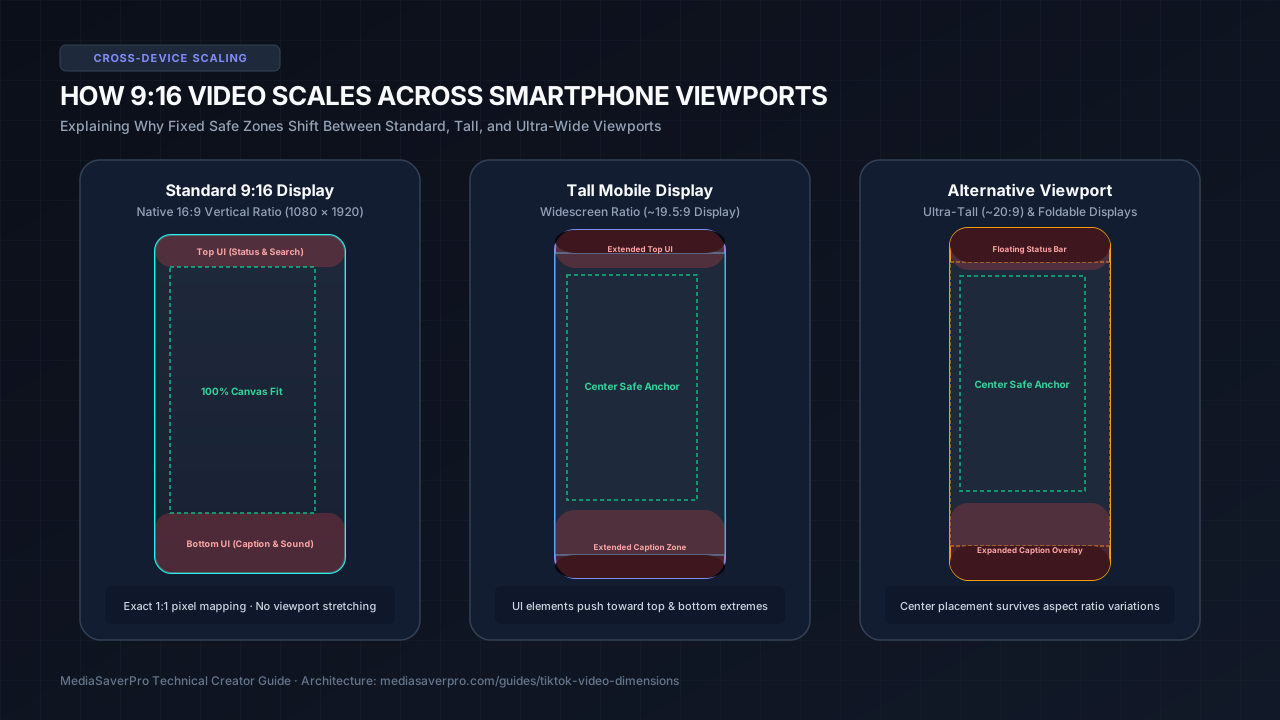
Why Safe Areas Vary Between Devices
Safe zones cannot be treated as a single static box because physical smartphone aspect ratios vary significantly.
Video File Size and Upload Limits
File size limits on TikTok depend heavily on the ingestion method and account environment. Mixing mobile constraints with desktop web tools is a frequent source of creator confusion.
Desktop Web Uploader & TikTok Studio
Uploading via desktop web through TikTok Studio (`tiktok.com/upload`) provides the highest limits:
Desktop uploads avoid mobile background timeouts, making them ideal for long-form tutorials and high-bitrate masters.
Mobile In-App Uploads
Uploading directly through the mobile app is governed by device hardware and cellular conditions:
TikTok Ads Manager File Constraints
In TikTok Ads Manager, specifications are enforced at the ad group level for paid commercial campaigns (separate from organic creator posts):
.mp4, .mov, .mpeg, .3gp, or .avi.Resolution and Video Quality: Managing Compression
A common question among video editors is whether exporting in 4K resolution provides a visual advantage on TikTok, or whether uploading 1080p produces superior results.
Ingestion and Resolution Considerations
1080 × 1920 is a practical vertical export target for creators. Higher-resolution uploads may be processed or recompressed by the platform, so final delivered quality can vary.
When planning your export resolution:
Enabling "Allow High-Quality Uploads" on Mobile
To enable maximum fidelity on mobile:
Recommended Creator Export Settings
MediaSaverPro recommends the following creator export parameters in Premiere Pro, DaVinci Resolve, Final Cut Pro, or CapCut:
Video Encoding Parameters (MediaSaverPro Recommendations)
Audio Encoding Parameters (MediaSaverPro Recommendations)
Color Management & Dynamic Range (MediaSaverPro Guidance)
Common TikTok Video Formatting Problems (and How to Fix Them)
Problem 1: Video Appears Blurry Immediately After Upload
Problem 2: Captions Hidden Behind the Right Action Rail or Creator Handle
Problem 3: Unwanted Black Bars on the Top and Bottom
Frequently Asked Questions
What are the official dimensions for a TikTok video?
The recommended dimensions are 1080 × 1920 pixels (vertical 9:16 aspect ratio). The minimum accepted resolution is 540 × 960 pixels.
Can I post horizontal (16:9) videos on TikTok?
Yes, but horizontal footage renders with black letterbox bars above and below. MediaSaverPro recommends formatting vertically in 9:16 for full-screen viewer retention.
What is the TikTok safe zone for captions?
TikTok does not publish an official static pixel safe zone for organic posts. MediaSaverPro recommends keeping core text within an approximate centered 910 × 1500 pixel practical placement area (~120px top, ~300px bottom, ~130px right clearance as editorial guidance).
What is the maximum file size you can upload to TikTok?
Desktop web uploads via TikTok Studio (tiktok.com/upload) support file sizes up to 4 GB. Mobile in-app uploads are constrained by local device storage and network conditions. For paid commercial campaigns in TikTok Ads Manager, In-Feed Video Ads are capped at 500 MB.
Does uploading in 4K improve video quality on TikTok?
Not necessarily. 1080 × 1920 is a practical vertical export target for creators. Higher-resolution uploads may be recompressed during ingestion, making delivered quality variable. Exporting a dedicated 1080 × 1920 master directly from your editing timeline provides predictable visual sharpness.
What export codec should I use for TikTok?
MediaSaverPro recommends MP4 with H.264 video (12–16 Mbps VBR) and stereo AAC audio at 48 kHz (192–320 kbps) for optimal compatibility and sharpness.
Optimize and Repurpose Your Social Media Video Assets
Building high-performing vertical content requires attention to technical detail at every stage of the production pipeline. Whether you are formatting original vertical videos for TikTok, repurposing clips across Instagram Reels and YouTube Shorts, or auditing aspect ratios on existing public media, MediaSaverPro provides the browser-based utilities you need.
Explore our MediaSaverPro TikTok utility tool to inspect publicly accessible media parameters, verify audio stream fidelity, or extract reference assets. To dive deeper into creator specifications across other platforms, browse our complete library of Creator Guides & Media Tutorials, including our in-depth reference on YouTube Thumbnail Size & Dimensions.